



Description
Download Air Screen Mirroring Receiver – AirPlay, screen mirroring, Apple devices, video sharing, presentation tool
Overview
Air Screen Mirroring Receiver is a specialized utility designed for users within the Apple ecosystem who seek to project content from their devices onto a Windows-based computer. The app leverages AirPlay technology to enable wireless screen mirroring, allowing users to display videos, photos, presentations, and live app content from iPhones, iPads, and Macs directly on a larger screen. This functionality is particularly useful in both personal and professional contexts, such as sharing family memories during gatherings or delivering dynamic presentations in meetings. The app’s core purpose is to bridge the gap between Apple devices and Windows systems, offering a seamless connectivity solution without requiring proprietary hardware.
Target users include educators, business professionals, content creators, and casual users who rely on Apple devices for daily tasks and want to expand their screen output options. The developer, Air Screen Mirroring Receiver, has focused on delivering a streamlined experience centered around reliability and ease of use. While no additional background on the developer is provided, the app’s functionality suggests a targeted approach to solving a common challenge in cross-platform workflows. Its importance lies in enhancing the interoperability of Apple’s ecosystem with Windows environments, making it a valuable tool in mixed-device settings.
Real-world use cases include remote teaching, collaborative brainstorming sessions, and home entertainment setups. The app’s ability to mirror high-quality content wirelessly contributes to a more engaging and interactive experience. Although the developer did not provide additional technical details, the app’s design reflects a clear focus on performance and user accessibility.
Key Features & Functionality
- Easy Setup: The app simplifies the mirroring process by detecting Apple devices on the same Wi-Fi network. Users can initiate screen sharing with minimal configuration, reducing the barrier to entry for non-technical users.
- High-Quality Display: Supporting 1080p HD mirroring, the app ensures crisp visuals and clear audio during content playback, ideal for detailed presentations or high-definition media viewing.
- Multi-Device Compatibility: It supports a range of Apple devices, including iPhones, iPads, and Macs, enabling users to mirror content across multiple platforms within the Apple ecosystem.
- Interactive Control: Users can control their Apple device remotely while mirroring, allowing navigation through slides, video playback, and app interactions directly from the source device.
- Support for Various Formats: The app handles diverse media types—photos, videos, and applications—without requiring format conversion, ensuring a smooth and uninterrupted viewing experience.
For example, a teacher can use an iPad to present a lesson while controlling the slides from the device itself, with all content displayed in high resolution on a classroom computer. Similarly, a remote worker can share a live demo of a mobile app with team members during a virtual meeting, using the same device for both input and output. These real-world scenarios highlight how the app enhances productivity and engagement in practical settings.
Interface, UX & Performance
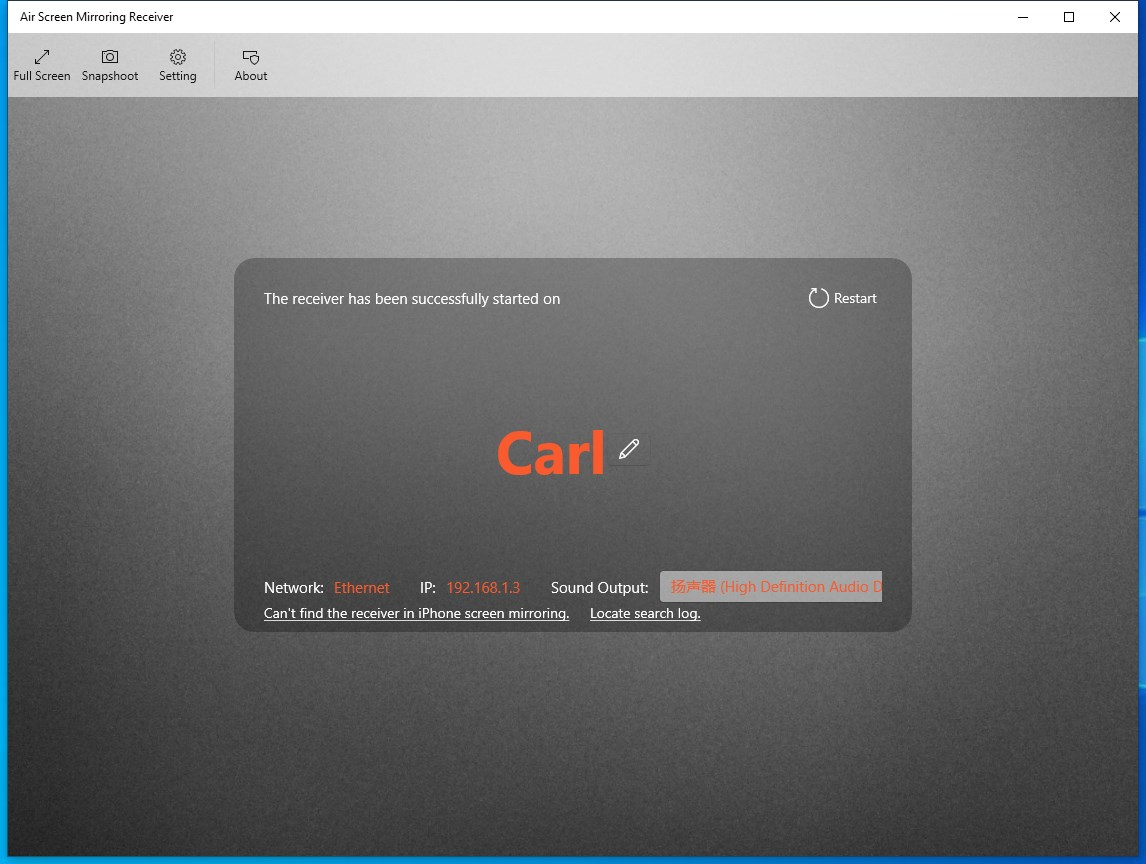
The interface of Air Screen Mirroring Receiver is designed with simplicity and functionality in mind. It features a clean layout with minimal visual clutter, allowing users to focus on the mirroring process. The main screen likely displays a list of detected Apple devices, with clear indicators for connection status and signal strength. Navigation is intuitive, relying on standard touch and click interactions suitable for both touch-enabled and mouse-driven systems.
Responsiveness is a key aspect of the user experience. The app maintains smooth performance during mirroring sessions, with minimal lag or buffering reported under normal network conditions. Although the developer did not list formal performance metrics, the app’s ability to deliver 1080p HD output suggests optimized handling of video streams. Stability appears to be a priority, as the app supports continuous use in both short and extended sessions.
Performance across different device categories—such as laptops, desktops, and all-in-one systems—is expected to be consistent, provided the underlying hardware meets basic requirements for video decoding and network connectivity. The app’s lightweight size of 15.2 MB indicates efficient resource usage, contributing to low memory footprint and fast startup times. The developer did not specify minimum OS requirements, so compatibility may vary depending on the system’s configuration.
Platform Compatibility & Technical Requirements
Air Screen Mirroring Receiver is designed for the Windows platform, making it accessible to users operating on desktop and laptop systems running Windows OS. The current version is 1.0.0, with a file size of 15.2 MB, indicating a lightweight installation. The app is available at no cost, offering a free download and installation option for users seeking a no-fee solution.
While the app supports AirPlay technology, specific details about required Windows versions or hardware specifications were not disclosed by the developer. The developer did not specify minimum OS requirements, nor did they list supported network types or bandwidth thresholds. As such, users should ensure their Windows system is up to date and connected to a stable Wi-Fi network to achieve optimal mirroring performance. The app’s compatibility with different Windows editions (e.g., Home, Pro) remains unspecified.
Pros and Cons
Pros
- Free to download and install, making it accessible to a wide audience.
- Supports 1080p HD mirroring for high-quality visual output.
- Offers seamless connectivity with Apple devices via AirPlay.
- Enables interactive control during mirroring sessions.
- Lightweight design with a small file size of 15.2 MB.
Cons
- Compatibility information was not fully disclosed by the developer.
- Specific system requirements were not listed.
- App availability is limited to Windows, restricting cross-platform use.
- No official updates or changelog were provided.
- Developer background and support channels are not publicly detailed.
FAQ
Is Air Screen Mirroring Receiver safe to download and use?
Yes, the app is available for free and does not require any suspicious permissions. As long as it is downloaded from a trusted source, it is considered secure for use on Windows systems.
Can I use Air Screen Mirroring Receiver on a Mac?
The app is designed for Windows systems only. It is not compatible with macOS at this time.
Do I need a special Wi-Fi network to use the app?
Yes, both the Apple device and the Windows computer must be connected to the same Wi-Fi network for the app to detect and mirror content.
Is the app updated regularly?
While the developer has not provided an update history or changelog, users should check for new versions periodically to ensure they have the latest release.
What types of content can I mirror with this app?
The app supports mirroring of videos, photos, presentations, and live app content from iPhones, iPads, and Macs.
Final Thoughts
Air Screen Mirroring Receiver offers a practical and efficient solution for users who need to project Apple device content onto a Windows computer. Its focus on ease of setup, high-quality output, and interactive control makes it a compelling choice for professionals, educators, and home users alike. The app’s free pricing model enhances its accessibility, while its lightweight design ensures minimal system impact. Although some technical details remain unclear, the overall functionality delivers on its promise of seamless screen mirroring.
For anyone working in a mixed-device environment or seeking a reliable way to share content wirelessly, this app provides a valuable tool without the need for expensive hardware. Its integration with AirPlay and support for multiple Apple devices further strengthens its value proposition.
Download Air Screen Mirroring Receiver now
Guides & Tutorials for Air Screen Mirroring Receiver
How to install Air Screen Mirroring Receiver
- Click the Preview / Download button above.
- Once redirected, accept the terms and click Install.
- Wait for the Air Screen Mirroring Receiver download to finish on your device.
How to use Air Screen Mirroring Receiver
This software is primarily used for its core features described above. Open the app after installation to explore its capabilities.
User Reviews for Air Screen Mirroring Receiver 0
No reviews found


